
How can we help?
Step-by-step how-tos and plain answers for every ZONAL screen, feature and setting.
Start here
The things new members ask about most.
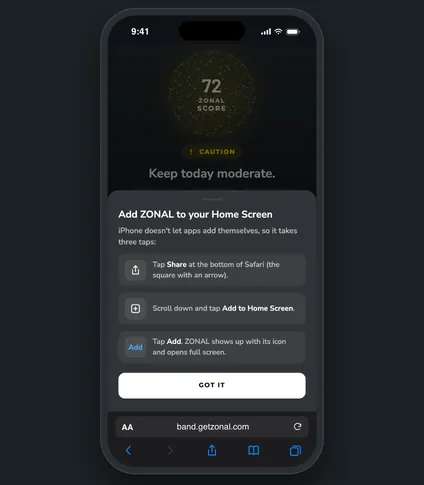
Add ZONAL to your Home Screen
Put ZONAL on your Home Screen so it opens full screen, like an app. On iPhone it takes three taps in Safari.
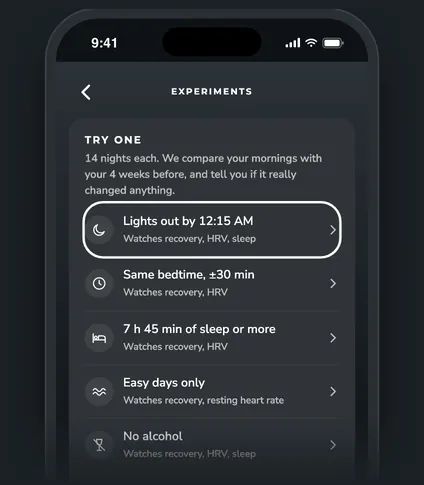
Start an experiment
Pick one change, set your target and start tonight. ZONAL compares the next 14 mornings with your 4 weeks before.
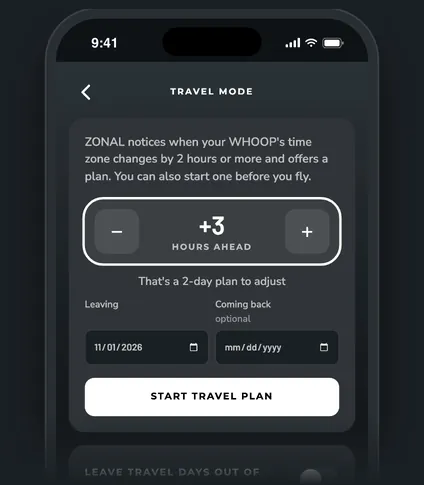
Use travel mode
Get a day-by-day jet lag plan when you cross time zones, and keep travel days out of your normals.
Browse by topic
43 articles in 10 topics.
Getting started
Sign in, put ZONAL on your Home Screen and find your way around.
6 articlesToday and the morning call
Your ZONAL Score, the go, caution or swap call, and what drove it.
6 articlesTomorrow's forecast
See tomorrow's recovery coming, and plan the day around it.
4 articlesTraining and load
Load balance, what each session costs you, and strain fit.
5 articlesTrends and reports
Trends, weekly reports, monthly recaps and what moves your numbers.
4 articlesExperiments
Try one change for 14 nights and see if it really helped.
4 articlesTravel and sick days
Travel mode, trips, sick days and getting back to baseline.
4 articlesBody and long-term stress
Long-term stress, weight, VO2 max and body fat.
2 articlesConnect your AI app
Ask Claude, ChatGPT or Cursor about your numbers in plain words.
4 articlesAccount, emails and privacy
Invites, emails, settings and deleting your data.
4 articlesStill stuck?
Email us and a person will get back to you, usually within a day.
info@optimizeme.today